ATARAXIA

GRANULAR NOISE SCULPTOR
// ZERO LOOPS. LIVE ACOUSTIC MICRO-GRAINS.Ataraxia is a dual-layer synthetic noise instrument and ambient environment generator for iOS. Unlike conventional sleep and focus apps that loop static audio recordings, Ataraxia synthesizes every raindrop, fan hum, and cavernous drone live in real time from hundreds of overlapping acoustic micro-grains.
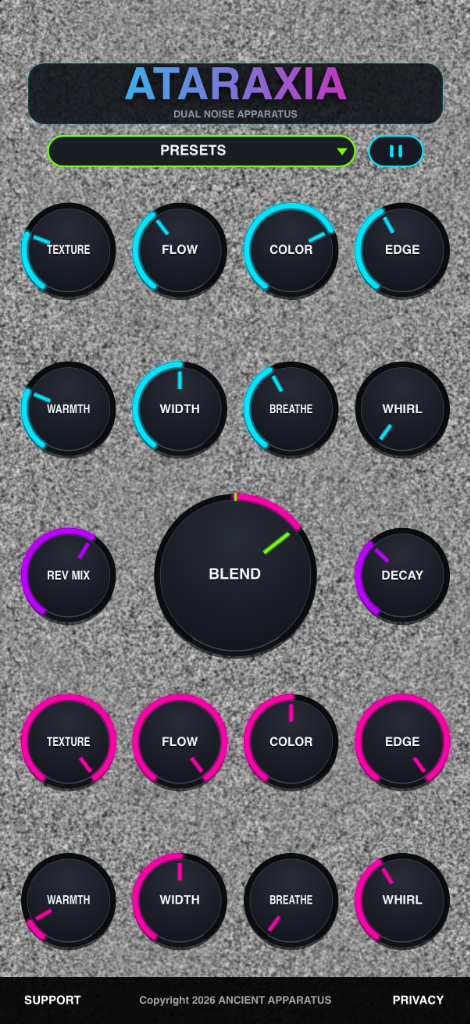
FIG 1.0 — ATARAXIA STANDALONE MATRIX (LAYER A CYAN // BLEND & REVERB // LAYER B PINK)
01 // SYSTEM OVERVIEW & SIGNAL FLOW
● REAL-TIME GRANULAR DSPNEVER-REPEATING SOUND
Pre-recorded noise loops eventually reveal audible seams that pull your brain out of rest or focus. Ataraxia spawns up to 256 concurrent noise grains shaped with smooth Hermite S-curve windows and Poisson timing scatter—creating an organic soundfield that never repeats a single second.
DUAL PARALLEL ENGINES
Sculpt two complete, independent noise layers simultaneously. Pair a crisp, close-up rain patter on Layer A (Cyan) with a deep, breathing sub-rumble on Layer B (Neon Pink), then sweep the central equal-power Blend dial to morph seamlessly between them.
STANDALONE + AUv3
Run Ataraxia as a standalone bedside or desk companion with full iOS background audio and instant visual/audio pause—or load it inside AUM, Logic Pro, GarageBand, Drambo, or Loopy Pro as an AUv3 synth texture generator with a dedicated landscape tab layout.
02 // KNOB & PARAMETER MANUAL
// 19 REAL-TIME SMOOTHED CONTROLSTEXTURE
10 ms → 300 ms Grain LengthControls the duration of each individual acoustic grain spawned by the engine. Low settings produce tiny, microscopic droplets and crackles; high settings stretch grains into long, velvety sheets of continuous sound.
FLOW
5 Grains/sec → 200 Grains/secSets the density and spawn rate of new grains. At minimum Flow, grains fire as distinct rhythmic pulses every 200 ms. Turning Flow clockwise packs grains tightly together (every 5 ms) into a seamless wall of noise.
COLOR
High-Pass ↔ Flat ↔ 4kHz BoostA three-zone spectral tilt control. Below 45%, it engages a zero-delay High-Pass filter (sweeping up to 2 kHz) to thin out bass. Between 45%–55% it runs flat. Above 55%, it boosts a 4 kHz High-Shelf for crisp sizzle.
EDGE
Soft S-Curve ↔ Crisp TransientShapes the attack and release fade ratio of every grain's Hermite S-curve window. At 0%, each grain fades in and out over 50% of its length for zero-transient silkiness. At 100%, the fade tightens to 2% for snappy, percussive clicks.
WARMTH
20 Hz → 20,000 Hz TPT Low-PassControls a topology-preserving transform (TPT) state-variable low-pass filter cutoff. Counter-clockwise rolls off harsh highs into a dark, subterranean rumble; clockwise opens the full 20 kHz spectrum.
WIDTH
0% Mono → 200% Mid/SideControls a per-sample smoothed Mid/Side stereo matrix. At 0%, the layer collapses to focused center mono. At 50%, grains sit in their natural random equal-power pan field. At 100%, the side channel expands to 200% for headphone immersion.
BREATHE
0.5 Hz Organic Swell LFOIntroduces a slow, sample-accurate 0.5 Hz sine LFO (one full cycle every 2 seconds) that simultaneously swells grain Flow density and gently opens and closes the Warmth low-pass filter cutoff.
WHIRL
0.8 Hz → 7.0 Hz Rotary DopplerEngages a stereo Leslie-style rotary speaker simulation with quadrature modulated delay lines. As Whirl increases, both the rotation speed (0.8 Hz to 7 Hz) and pitch/amplitude Doppler depth intensify.
BLEND
-1.0 (Layer A) ↔ +1.0 (Layer B)The oversized central performance control. Uses a constant-power cosine/sine crossfade curve so total perceived loudness stays rock-steady as you sweep between Layer A (Cyan arc left) and Layer B (Pink arc right).
REV MIX & DECAY
Stereo Algorithmic Reverb BusREV MIX blends dry granular detail with stereo diffusion while intelligently preserving dry presence. DECAY scales the acoustic chamber from a tight room up to a massive 98% cavernous tail.
03 // CURATED FACTORY PRESETS
// INSTANT STARTING POINTSFan
PRESET 01Models the comforting, low-mid acoustic hum and gentle air buffeting of a vintage bedside box fan. Layer A introduces subtle rotary Whirl (52%) over warm 2.2 kHz grains, while Layer B anchors the body at 1.5 kHz.
Rain
PRESET 02Driven by Ataraxia's internal Poisson grain-scatter engine. Layer A generates crisp, high-passed individual raindrops (0% Texture, 100% Edge), while Layer B provides a wide, warm 2.5 kHz downpour bed.
Machine Noise
PRESET 03A rhythmic, industrial sci-fi telemetry room. Layer A pulses with slow, breathing mechanical clicks (4% Flow, 100% Breathe), while Layer B swirls at 100% Whirl through a 100% wet, infinite reverb chamber.
Inside Void Being
PRESET 04Deep, meditative cosmic womb ambiance. Both layers run at maximum grain length and density with 0% Edge for pure, transient-free silkiness, wrapped in slow breathing modulation, 65% rotary drift, and 100% reverb immersion.
04 // TUTORIALS & WORKFLOW GUIDE
// FROM FIRST LAUNCH TO AUv3 HOSTINGYOUR FIRST 60 SECONDS WITH ATARAXIA
-
Select a Factory Preset: Tap the central green-outlined
PRESETSpill bar under the title window to open the scrollable preset overlay. TapFan,Rain,Machine Noise, orInside Void Being. -
Morph Between Layers: Drag the large center
BLENDknob left toward the Cyan arc to solo Layer A, or right toward the Pink arc to solo Layer B. Notice how `Rain` shifts from sharp individual droplets (left) to a warm distant downpour (right). -
Tune Brightness to Your Room: Adjust
WARMTHon the active layer to roll off high frequencies until the sound sits comfortably in your headphones or speakers. -
Instant Mute & Visual Freeze: Tap the
||Pause button next to the preset bar. Ataraxia smoothly fades audio out over 20 ms (zero clicks), freezes the CRT static background, and dims the neon dials into standby mode.
BUILDING A CUSTOM SLEEP OR FOCUS SOUNDSCAPE
-
Step 1 — Craft a Deep Foundation (Layer B): Set Layer B
TEXTUREto 100%,FLOWto 100%, andEDGEto 0%. Lower Layer BWARMTHto around 9:00–10:00 (~800–1,800 Hz) for a velvety brown-noise-style bed. -
Step 2 — Add Subtle Organic Motion: Turn Layer B
BREATHEup to 15–20% so the low-end gently inhales and exhales every two seconds, and setWIDTHto 75% for spaciousness. -
Step 3 — Layer Air or Mechanical Detail (Layer A): Set Layer A
WARMTHhigher (~3,500 Hz) and raiseWHIRLto ~40% to add gentle rotary air movement. -
Step 4 — Balance & Glue: Set
BLENDslightly right of center (+0.30) and dial in 35%REV MIXwith 50%DECAYto fuse both layers into one cohesive acoustic room.
SAVING & ORGANIZING USER PRESETS
-
Saving a Custom Patch: Once you have dialed in a soundscape you love, tap the
PRESETSpill button and tap+ ADD PRESETat the top of the overlay menu. - Naming Your Preset: Enter a custom name in the dialog and tap Save. Your preset is stored as a lightweight `.ataraxiapreset` XML file in the app sandbox and appears under the USER PRESETS section.
-
Overwriting or Deleting: Saving a preset with the same name updates it in place. To remove a user preset, open the preset menu and tap the red
xbutton on the right side of that preset's row. - State Recall: Both your active knob positions and currently selected preset name are automatically saved with your host project or standalone session.
USING ATARAXIA AS AN iOS AUv3 PLUGIN
- Loading in an AUv3 Host: Open an AUv3-compatible host such as AUM, Logic Pro for iPad, GarageBand, Drambo, or Loopy Pro, and insert Ataraxia (under Ancient Apparatus) into an Instrument / Synth slot.
-
Adaptive 3-Tab AUv3 Interface: In compact plugin windows, Ataraxia automatically switches to a streamlined 800×450 landscape layout with three dedicated view tabs—
BLEND,LAYER A, andLAYER B—so every dial remains large and touch-friendly. - Host Automation & Multi-Instance Layering: All 19 parameters (plus internal grain scatter) are exposed to your AUv3 host for LFO modulation, MIDI mapping, and timeline automation.
- External FX Processing: Try routing Ataraxia into Ancient Apparatus's Tapes on Tapes in AUM for multi-reel cassette saturation and delay matrixing.
Have an idea for new granular textures, noise generator topologies, sleep timer features, or an anomaly to report for Ataraxia? Transmit your ideas directly to our lab: